 |
NeuroScript MovAlyzeR Help | Send comments on this topic. |
Glossary Item Box
|
NeuroScript MovAlyzeR Help | Send comments on this topic. |
Drawing Options Settings
From here you can alter how the experiment is presented in the recording window.
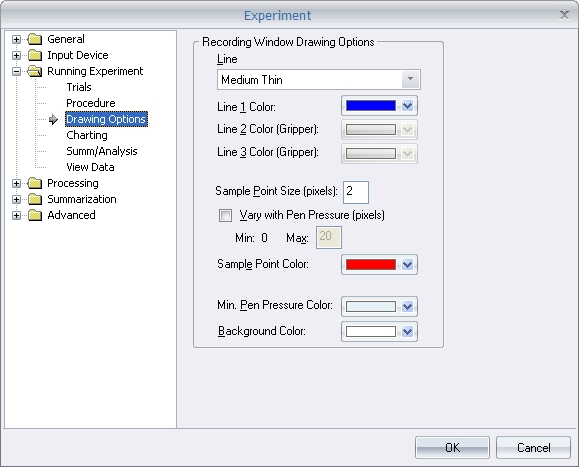
o Line - Select your line thickness from thin to thick (the "pen ink").
o Background Color - Select the color for the recording window background.
o Line # Color: Select the colors for the displayed lines. Line 1 is the "pen ink" for handwriting experiments and the lower-grip pressure for grip-force experiments. Lines 2 and 3 are only for grip-force experiments and represent upper-grip pressure and load, respectively.
o Ellipse Color: Select the color for the ellipses which represent the samples.
o Ellipse Radius: Enter the width of the ellipse in pixels.
o Minimum Pen Pressure Color: Select the color to display pen-up movements (or movements where the pen pressure is below the minimum).
| See Also |
NSHelp: Experiment Properties | Experiment Input Device | Run Experiment Trial Settings | Experiment Settings Report
© NeuroScript LLC. All Rights Reserved.