 |
NeuroScript MovAlyzeR Help | Send comments on this topic. |
Glossary Item Box
|
NeuroScript MovAlyzeR Help | Send comments on this topic. |
Experiment Properties Settings
These settings apply to an entire experiment because the experimenter will have no need to use different experiment settings per subject group or experiment condition.
NOTE: It is possible to process groups, subjects, or conditions with different settings and then summarize those results but we do not recommend it.
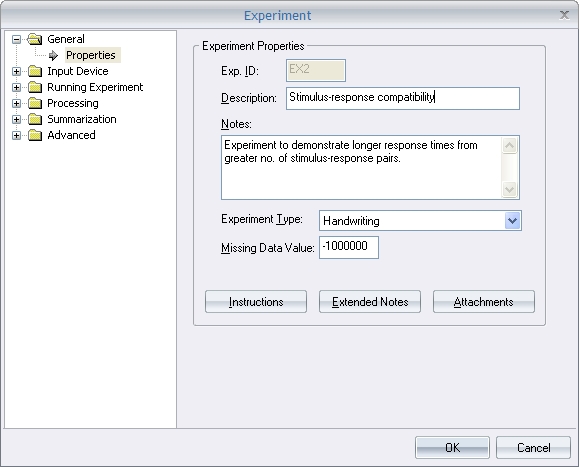
o Experiment ID: Enter a unique, 3-letter ID (must differ from reserved directory names CON and NULL).
o Description: Enter a description for this experiment. This is displayed in the left-view tree along with the ID.
o Notes: Here you can enter some brief notes about this experiment.
o Instructions: Click this button to bring up the rich-text editor to enter the experiment's instructions which are displayed to subjects at the start of an experiment.
o Experiment Type: Choose between a handwriting or grip-force experiment.
o Extended Notes: You can add additional (longer) notes for this experiment.
| See Also |
NSHelp: Experiment Instructions | Extended Notes | Experiment Input Device | Run Experiment Trial Settings | Processing Time functions | Processing Segmentation Settings | Processing Extraction Settings | Word Extraction | Processing Summarization | Experiment Draw Options Settings | Experiment Settings Report | Experiment/Group/Subject Process
© NeuroScript LLC. All Rights Reserved.