|
NeuroScript MovAlyzeR Help | Send comments on this topic. |
Glossary Item Box
|
NeuroScript MovAlyzeR Help | Send comments on this topic. |
Segmentation: Flags and Settings
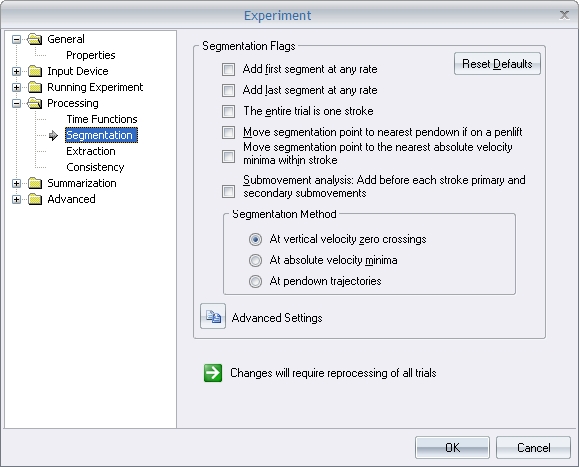
Flags
o Add first segment at any rate and Add last segment at any rate: Check this option to prevent discarding of the first and last segments.
Normally, recordings should start with the pen at rest on paper. At the end of the trial the pen should be lifted and kept at rest slightly above the tablet. If the velocity is not close to zero at the beginning and/or at the end of a trial, the first and last segments will be discarded by default.
o The entire trial is one stroke: Although a trial may have multiple strokes, the entire pattern is considered as one stroke. In this case, there is only one stroke per trial. If you perform submovement analysis, then this stroke is split in to primary and secondary strokes.
o Move segmentation point to the nearest pendown if on a penlift: If a segmentation point occurs during pen-up samples it will be moved to the nearest pen-down point if it is less than half of the duration of the stroke or the next stroke. Unless a penlift trajectory contains multiple back and forth movements, this option ensures that most segmentation points are on pen down trajectories. Moving such a point may make normalized jerk and submovement analysis less interpretable, though.
o Move segmentation point to the nearest absolute velocity minima within stroke: Move the vy zero crossing segmentation point to the nearest vabs minimum if such a vabs minimum occurs within half of the duration of the previous or the next stroke. This option works as absolute velocity segmentation of up and down strokes. The benefits are most noticeable in cursive script where, for example, an upstroke is ending with a small downward stroke followed by velocity reversal. The stroke end point will then be at the velocity reversal and not at the highest point of the stroke.
o Submovement Analysis (Applies only to MovAlyzeR): Checking this option implements submovement analysis during trial processing. A stroke can be further segmentated into submovements: A primary ("ballistic") and a secondary ("Feedback based, corrective") submovement. According to the optimized submovement analysis, the secondary submovement starts at the first negative to positive zero-crossing of acceleration after the peak velocity.
For more information, refer to the section on Submovement Analysis
o Segmentation Method:
At vertical velocity zero crossings: Segment at the vertical velocity zero crossings as determined by the segmentation settings. This is the default segmentation method.
At absolute velocity minima: Segmentation is performed by Absolute Velocity (vabs). Details on the segmentation procedure.
At pendown trajectories: Segmentation is performed for every continuous pendown movement.
Segmentation points are defined as the zero-crossing velocities absolute minima points of the samples.
A segment is the length between two segmentation points.
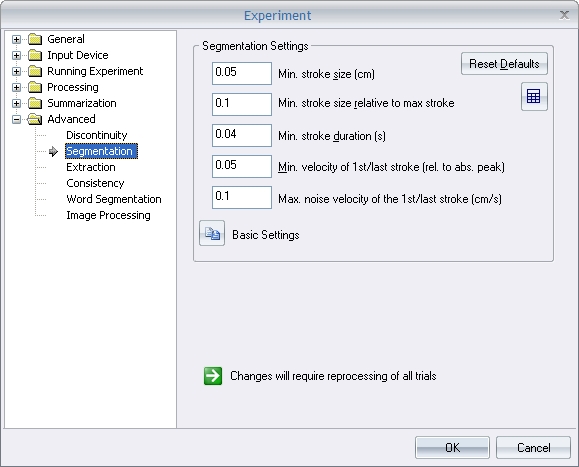
The following parameters are used to modify the segment/stroke properties:
o Min. stroke size (cm): A minimum relevant stroke length is estimated from the samples using the min stroke size relative to max stroke size (cm). If this length is lesser than the min stroke size (cm) specified, then the minimum stroke size of the output strokes is set to the value specified.
~For example: If this value is specified to be 5 cm and the program determines that there may be segments with smaller lengths, then the smallest output stroke will have a length of 5 cm. The default value of 0.1 cm is in most cases lesser than the actual segment lengths and therefore does not overwrite the actual value.
o Min. stroke size relative to max stroke (cm): This value is used to determine the stroke length for the segmentation.
o Min. stroke duration (s): If the actual stroke duration of the segments is lesser than this value, then the minimum stroke duration for the output strokes is set to specified value.
o Min vertical velocity of 1st/last stroke and Max vertical velocity of 1st/last stroke: If a first/last stroke begins/ends with a velocity out of this min/max relative vertical velocity, then the starting point is moved to the next value and ending segmentation point is dropped and is moved to the previous value.
| See Also |
NSHelp: Segmentation | Processing Time functions | Processing Extraction Settings | Word Extraction | Processing Summarization
© NeuroScript LLC. All Rights Reserved.